> ## Documentation Index
> Fetch the complete documentation index at: https://docs.usechamber.io/llms.txt
> Use this file to discover all available pages before exploring further.
# Integrations
> Connect Chamber with your tools for notifications, alerts, and reports
Stop context-switching between tools. Chamber integrates directly with the platforms your team already lives in, so GPU alerts, usage reports, and AI-powered insights show up right where you work.
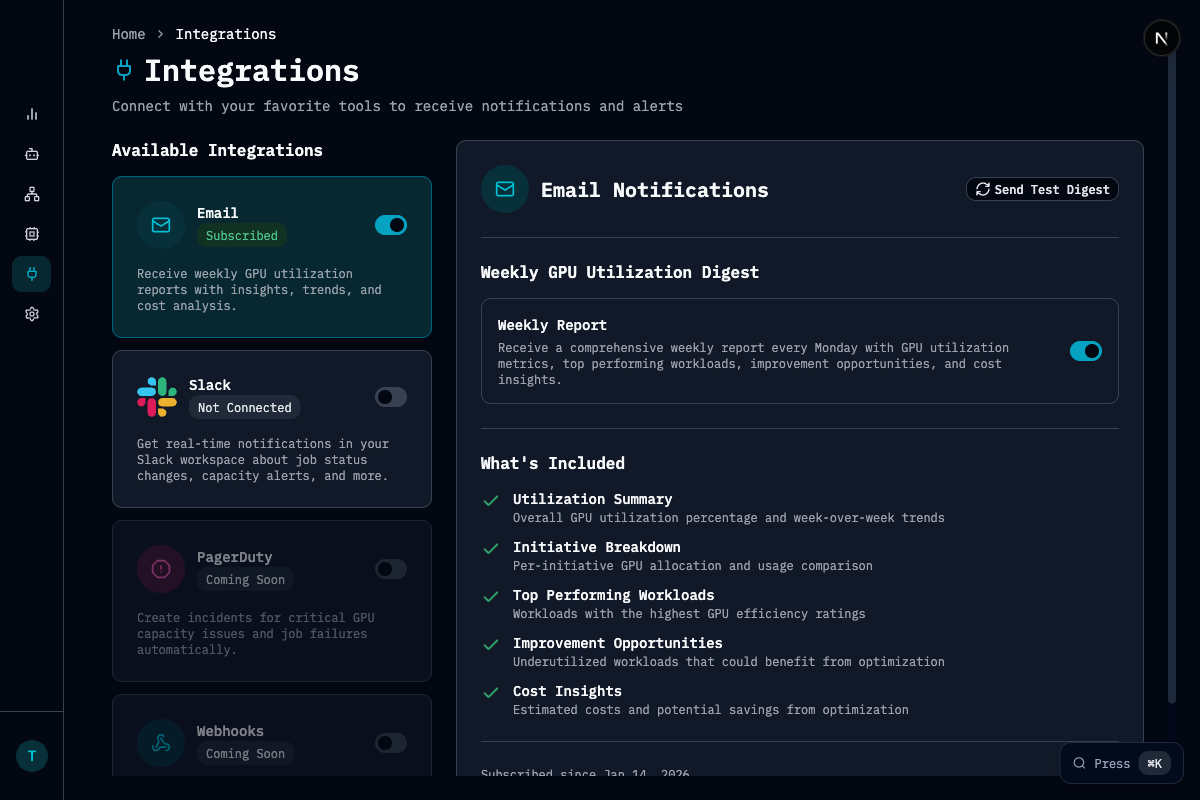 ## Available Integrations
Real-time workload and capacity alerts in your channels, an AI chatbot for natural-language queries, per-user notification preferences, and automated team reports on a schedule you choose.
Weekly and daily GPU utilization digests delivered to any inbox, per-user workload notifications, support for external email aliases, and AI-composed emails backed by real usage data.
| Integration | Status | Highlights |
| ------------- | ----------- | ------------------------------------------------------------- |
| **Slack** | Available | Notifications, AI chatbot, channel routing, scheduled reports |
| **Email** | Available | Utilization digests, workload alerts, AI-powered email |
| **PagerDuty** | Coming Soon | Incident creation for critical capacity and workload issues |
| **Webhooks** | Coming Soon | HTTP callbacks for custom automation |
## What You Can Get Notified About
Between Slack and email, Chamber keeps your team informed across every stage of the GPU lifecycle:
| Category | Events | Slack | Email |
| ---------------------- | ------------------------------------------------------------- | --------------------- | -------------------- |
| **Workload Lifecycle** | Started, completed, failed, preempted, queued, cancelled | Per-user preferences | Per-user preferences |
| **Capacity Alerts** | Utilization warnings, pool capacity low, reservation expiring | Org-level toggles | — |
| **Clawback** | Reclaimable underutilized reserved capacity | Org-level toggle | — |
| **Reports** | Daily and weekly utilization digests | Scheduled to channels | Scheduled to inboxes |
| **AI Outreach** | AI-composed messages with real usage data | Via chatbot | AI-drafted emails |
## Getting Started
Head to **Settings → Integrations** in the Chamber dashboard to connect Slack, or **Settings → Notifications** to configure email preferences.
Need an integration we don't support yet? Let us know!
## Available Integrations
Real-time workload and capacity alerts in your channels, an AI chatbot for natural-language queries, per-user notification preferences, and automated team reports on a schedule you choose.
Weekly and daily GPU utilization digests delivered to any inbox, per-user workload notifications, support for external email aliases, and AI-composed emails backed by real usage data.
| Integration | Status | Highlights |
| ------------- | ----------- | ------------------------------------------------------------- |
| **Slack** | Available | Notifications, AI chatbot, channel routing, scheduled reports |
| **Email** | Available | Utilization digests, workload alerts, AI-powered email |
| **PagerDuty** | Coming Soon | Incident creation for critical capacity and workload issues |
| **Webhooks** | Coming Soon | HTTP callbacks for custom automation |
## What You Can Get Notified About
Between Slack and email, Chamber keeps your team informed across every stage of the GPU lifecycle:
| Category | Events | Slack | Email |
| ---------------------- | ------------------------------------------------------------- | --------------------- | -------------------- |
| **Workload Lifecycle** | Started, completed, failed, preempted, queued, cancelled | Per-user preferences | Per-user preferences |
| **Capacity Alerts** | Utilization warnings, pool capacity low, reservation expiring | Org-level toggles | — |
| **Clawback** | Reclaimable underutilized reserved capacity | Org-level toggle | — |
| **Reports** | Daily and weekly utilization digests | Scheduled to channels | Scheduled to inboxes |
| **AI Outreach** | AI-composed messages with real usage data | Via chatbot | AI-drafted emails |
## Getting Started
Head to **Settings → Integrations** in the Chamber dashboard to connect Slack, or **Settings → Notifications** to configure email preferences.
Need an integration we don't support yet? Let us know!